

Review · AIRPORT TRANSFERS
Japan Unlimited WiFi Router – Narita Airport Pickup
Skip Narita uncertainty with Wi-Fi ready fast. This Narita airport pickup gives you a 4G LTE hotspot you can use the moment you land, and I like that it comes with practical power gear like a power bank plus the cables and adapter. One thing to keep in mind is the fine print on speed: high speed data is limited to 3GB per day, so heavy video streaming can run out quicker than you expect.
Pick up happens at counters outside airport security at either Terminal 1 or Terminal 2, and you use a mobile ticket instead of hunting for paperwork. My other takeaway is that setup is straightforward once you have the router in hand, which is a relief after a long flight. The main drawback I’d plan around is device limits, since the info you’ll see can vary between up to 10 devices and up to 5 devices at once, so check your confirmation before you pack in a big group.
In This Review
- Key Highlights You’ll Actually Feel
- Narita Airport Pickup That Gets You Online Fast
- What to bring with you
- How the Unlimited Wi-Fi Works (High Speed 3GB Per Day)
- Router Setup and Using It With Up to 10 Devices
- The “connected” experience you should expect
- What This Rental Actually Lets You Do Across Japan
- Duration Options: Pick the Length That Fits Your Real Trip
- The Logistics That Matter at Narita: Outside Security and Mobile Ticket
- Value for $15.85 Per Person: When It’s Worth It
- Who This Narita Wi-Fi Router Pickup Is Best For
- Should You Book This Narita Wi-Fi Router Pickup?
- FAQ
- Where are the pickup and return counters located at Narita?
- Can I pick up the router at both Terminal 1 and Terminal 2?
- Do I need a paper ticket?
- What type of internet connection does the router use?
- How long is the rental available for?
- How many devices can I connect to the Wi-Fi router?
- Is the Wi-Fi truly unlimited?
- Is a power bank included?
- What happens if I do not collect the router?
- What is the cancellation policy?
Key Highlights You’ll Actually Feel
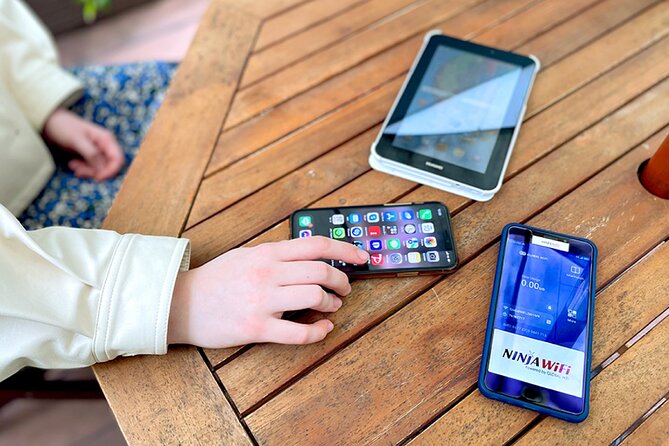
- Narita Terminal 1 or Terminal 2 pickup (outside security) means less sprinting after customs
- 4G LTE connection so you can use maps and messaging without hunting for public Wi-Fi
- Power bank included so you can keep the router running longer on the move
- Mobile ticket helps you arrive prepared, not searching for printouts
- Speed cap: 3GB per day high speed data so plan for how you’ll use the internet
- Small group cap (max 10) for a smoother pickup flow
Narita Airport Pickup That Gets You Online Fast
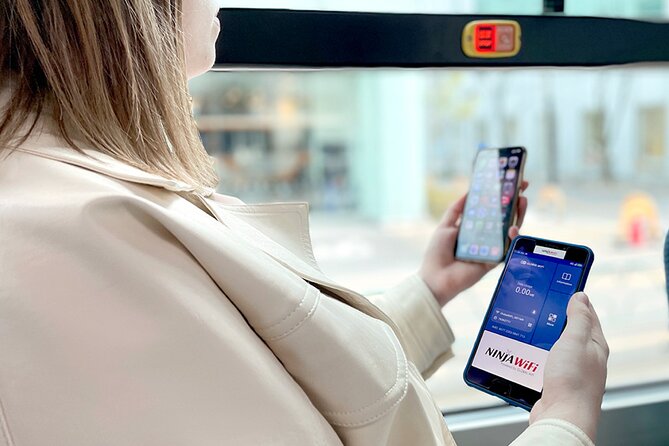
The best part of this kind of rental is what it prevents. You land at Narita, your phone battery drops fast, and suddenly you’re trying to figure out trains, transfers, and the right exit. This Wi-Fi setup is built to stop that panic by getting you connected right away with a 4G LTE router.
Pickup is at counters located outside airport security, which matters more than it sounds. It means you can handle the Wi-Fi task without being forced into an extra security shuffle. In plain terms, you step out, grab the device, then focus on getting to Tokyo or wherever your trip starts.
You can pick up at either Narita Terminal 1 or Terminal 2. That flexibility is great if your flight plans change, and it also reduces the chance of you booking a service that only works for one terminal. If you’re traveling with someone, this is one of those small wins that makes the first hour feel calmer.
Then there’s the “ready when you arrive” detail. One strong positive note in the feedback described the router being packed and waiting at the counter, with an easy setup. When it works like that, you skip the awkward delays that sometimes happen with rentals after a busy arrival rush.
A few more Narita days to weigh up
- Airport transfer: Narita, Haneda (Tokyo), HND-NRT Airport shuttle
★ 4.5 · 26 reviews - Private Transfer from Narita Airport to Yokohama Port and City
★ 4.5 · 17 reviews - Private Car transfer from Narita airport to Tokyo
★ 5.0 · 16 reviews
What to bring with you
You don’t want to reach the counter and realize you’re missing a key detail. Even though the pickup is simple, bring what you used for booking so you can scan or show your mobile ticket. Also plan to have your phone charged enough to follow the setup steps.
How the Unlimited Wi-Fi Works (High Speed 3GB Per Day)
The word unlimited is tempting, but the real story is how the data is managed. Here’s what you can count on from the provided details: high speed data is limited to 3GB per day.
So what does that mean for you on the ground? If your daily use is mainly:
- Google Maps and transit navigation
- Messaging and email
- Social media scrolling
- Occasional YouTube
…you’ll likely be fine. If your plan includes long hours of streaming or downloading large files every day, the 3GB high speed limit will matter. The service is still useful after the quota, but you should expect your “I can watch anything instantly all day” style of usage to be less smooth once the high speed portion is used up.
This is where the “unlimited router” concept becomes practical. You aren’t renting Wi-Fi only for one app. You’re renting the safety of always being able to check directions, confirm station names, and look up the next step when you’re tired and jet lagged. That’s the main value, even if your speed gets throttled after the daily cap.
Router Setup and Using It With Up to 10 Devices

The rental includes the Wi-Fi router plus the basics you need to make it work: a USB cable, an adapter, and a power bank. That last item is a big deal in real life. In Japan, you’ll find plenty of places to charge devices, but your first day off a long flight can be a bottleneck. Having the power bank with the router helps you keep the hotspot running while you move.
Now, device count is the one part you should double-check. The highlights say you can connect up to 10 devices, while another section says the router can connect up to 5 devices at once. That doesn’t mean either part is lying. It may depend on the exact model or the way the provider defines connected devices versus active connections.
My advice: before your trip, open your booking confirmation and look for the device limit language that matches the unit you’ll receive. If you’re traveling as a family or a small group with multiple phones and tablets, it’s smart to plan on fewer devices using Wi-Fi at the same time, just to avoid slowed connections.
A different sort of day in Japan:
- Narita Airport (NRT) Private Transfer to Central Tokyo
★ 4.5 · 300 reviews - Private arrival Transfer from Narita Airport(NRT) to central Tokyo city
★ 4.5 · 128 reviews - From Narita Airport: Private Layover or Transit Guided Tour
★ 4.8 · 29 reviews - For Narita Airport Users: Layover or Transit Guided Private Tour
★ 5.0 · 22 reviews
The “connected” experience you should expect
With a hotspot in your pocket, you can:
- check Google Maps as you transfer between train lines
- look up opening hours and addresses when your plans shift
- use social apps like Facebook and Instagram
- watch YouTube when you have a moment
And the real-world benefit is confidence. When you know you can pull up directions instantly, you can decide on the fly, instead of committing to a route only because you might not find Wi-Fi later.
What This Rental Actually Lets You Do Across Japan

This isn’t a guided tour where you follow a schedule and stop at named sights. It’s better thought of as a tool that makes your Japan days easier, especially around transportation.
I like Wi-Fi rentals most in the first 24 hours. That’s when you are most likely to make mistakes:
- exiting at the wrong station
- missing a transfer
- not recognizing a street name once you’re out of the station
- assuming a train goes somewhere it doesn’t
With consistent mobile Wi-Fi, you can correct course quickly. You don’t have to guess, and you don’t have to rely on memory when you’re dealing with kanji, station codes, and line names in a rush.
One note from the feedback mentioned recommending traditional street food and noticing the contrast between old and new in Japan. Whether you’re chasing a snack stall or hopping between modern neighborhoods and older streets, internet access helps you find what you’re looking for and confirms details like locations and timing. You spend less time lost, and more time doing what you actually came for.
Duration Options: Pick the Length That Fits Your Real Trip

The rental range is listed as 3 to 30 days, and it’s designed for short trips and longer stays. Average booking timing is about 20 days in advance, which suggests most people plan ahead rather than waiting until the last week.
Here’s how I’d choose your duration in a practical way:
- If you’re staying a few days and only need airport to city access, pick the minimum that covers the full travel window.
- If your itinerary includes multiple side trips and you’ll rely on maps all day, lean toward the longer end of your estimated schedule.
The goal is simple: don’t end up with the hotspot timing out right when you need it most. Since you’re returning to the airport for pickup and return counters outside security, it’s also helpful to match the router rental end date with your actual departure day.
The Logistics That Matter at Narita: Outside Security and Mobile Ticket

Pickup and return counters are outside airport security. That’s an underrated advantage because it typically reduces the chance you’ll get stuck in the “I’m not sure where to go next” loop after landing. You can handle the rental before you fully settle into your airport flow.
You’ll also receive a confirmation at the time of booking, and you’ll use a mobile ticket. That means fewer physical steps at the counter.
That said, one negative feedback point is worth respecting. It described a router delivery problem related to a hotel delivery request that did not arrive, plus difficulty contacting someone. Even though your specific service is Narita airport pickup, the lesson applies: stick to the pickup method you booked, and make sure your details match the plan you’re executing. If your reservation details are unclear, sort them before you fly.
Value for $15.85 Per Person: When It’s Worth It

At $15.85 per person, this can be a good value if you’ll actually use the internet beyond just checking one or two apps. The reason is that transportation stress is expensive in time and energy. When Wi-Fi is reliable, you stop spending your day on guesswork.
It’s also usually worth it when:
- you’re using public transit and need maps frequently
- you’re traveling with multiple people who need consistent navigation
- you want flexibility, not fixed schedules
- you don’t want to hunt down Wi-Fi at cafes or airports mid-journey
One caution on value: the 3GB per day high speed limit means the “most benefit” comes from smart usage. If you treat it like unlimited home internet for streaming, the value drops because you may feel the speed limits. If you treat it as your navigation and information backbone, it’s often a strong deal.
And you’re not paying only for Wi-Fi. The rental includes the router, USB cable, adapter, and power bank. That’s part of what makes it easy to start without scrambling for charging gear at the worst time.
Who This Narita Wi-Fi Router Pickup Is Best For

This service is ideal if you:
- land at Narita and want connectivity immediately after arrival
- rely on Google Maps for train transfers
- want a simple, low-effort setup
- prefer a small-scale pickup setup, since the maximum group size is listed as 10
It’s also a good fit for people who don’t want to pay attention to Wi-Fi finding and login screens after a flight. The whole point is you get out of the airport with internet already functioning.
If you’re extremely cost-sensitive and only need occasional messaging, you might find cheaper alternatives elsewhere. But if you want fewer “Where do I go next?” moments, this kind of hotspot tends to pay you back quickly.
Should You Book This Narita Wi-Fi Router Pickup?
Yes, if your priority is early trip stability. If you care about getting directions right away at Narita and staying connected across Japan without relying on random Wi-Fi spots, this is exactly the kind of rental that makes your first day smoother.
I would book it when your usage matches real travel needs: maps, messaging, basic info lookups, and light streaming. I’d also book it if you like the idea of a small pickup setup with the router ready at the counter and an included power bank.
I would hesitate if your group has many devices and you’re not sure about the exact device limit for your specific router model. I’d also be cautious if you tend to request non-matching delivery arrangements. Stick to the airport pickup that your booking covers, since refunds are not provided for not collecting the router.
If you want a simple, practical first step to Japan, this rental is a solid choice, especially for anyone planning to use transit and maps heavily from day one.
FAQ
Where are the pickup and return counters located at Narita?
The pickup and return counters are located outside of airport security.
Can I pick up the router at both Terminal 1 and Terminal 2?
Yes, pickup is available at either Terminal 1 or Terminal 2.
Do I need a paper ticket?
No, this rental uses a mobile ticket.
What type of internet connection does the router use?
The router provides a 4G LTE Wi-Fi connection.
How long is the rental available for?
The rental duration is listed as approximately 3 to 30 days.
How many devices can I connect to the Wi-Fi router?
The details you’ll see include up to 10 devices in the highlights, and up to 5 devices in another section. Check your booking confirmation for the device limit tied to your specific rental.
Is the Wi-Fi truly unlimited?
High speed data is limited to 3GB per day. The product is still marketed as unlimited, but the high speed portion has that daily cap.
Is a power bank included?
Yes. The rental includes a power bank along with the router, USB cable, and adapter.
What happens if I do not collect the router?
Refunds will not be provided for not collecting the Wi-Fi router.
What is the cancellation policy?
Free cancellation is available if you cancel up to 24 hours in advance. If you cancel less than 24 hours before the experience’s start time, you will not receive a refund.
Newly listed around Narita
- Tokyo Layover Tour with a Local – Private & Tailored to You★ 4.5 · 12 reviews
- For Narita Airport Users: Layover or Transit Guided Private Tour★ 5.0 · 22 reviews
- Shared Arrival Transfer : Narita International Airport to Hotel (Central Tokyo)★ 4.0 · 12 reviews
- Airport transfer: Narita, Haneda (Tokyo), HND-NRT Airport shuttle★ 4.5 · 26 reviews
- Private Transfer from Narita Airport to Yokohama Port and City★ 4.5 · 17 reviews
- Private arrival Transfer from Narita Airport(NRT) to central Tokyo city★ 4.5 · 128 reviews
- Private Car transfer from Narita airport to Tokyo★ 5.0 · 16 reviews
- Private Arrival Transfer : Narita International Airport to Yokohama City★ 5.0 · 6 reviews
Airport Transfers, compared.

Airport transfer: Narita, Haneda (Tokyo), HND-NRT Airport shuttle
Read our review →
Chitose Airport to Niseko Private Transfer | Licensed Driver
Read our review →
Private Transfer from Narita Airport to Yokohama Port and City
Read our review →
Private Car transfer from Narita airport to Tokyo
Read our review →
Private Airport transfer Kansai Intl. Airport(KIX) to OSAKA CITY
Read our review →
Private Arrival Transfer : Narita International Airport to Central Tokyo City
Read our review →
Shared Arrival Transfer : Narita International Airport to Hotel (Central Tokyo)
Read our review →
Private Arrival Transfer : Narita International Airport to Yokohama City
Read our review →Browse the lists this tour appears in