Review · TOKYO TOURS
Narita Airport | Japan Wi-Fi Rental | Unlimited Data
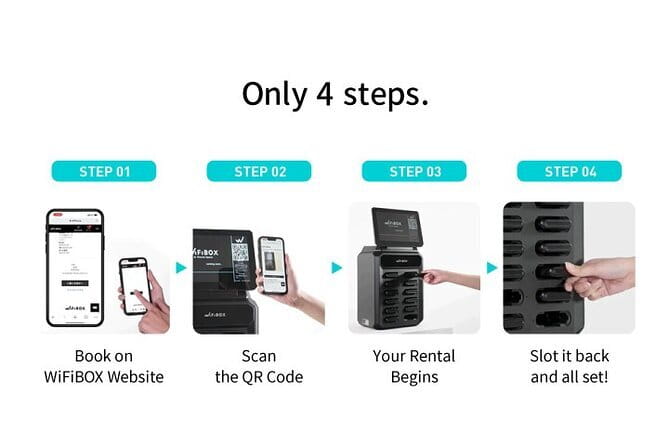
Good Wi-Fi starts the whole Japan trip. This Narita-based rental is built for speed, with a scan-and-go pickup flow and easy return at the airport, so you can spend less time stuck in lines and more time getting your bearings. I especially like the unlimited 4G LTE setup and the ability to connect multiple devices at once, which matters a lot when you’re sharing Google Maps, messages, and ride plans.
The main consideration is that unlimited data still follows a Fair Usage Policy, and some accounts report occasional longer signal dropouts. It is usually smooth, but it is smart to plan for minor hiccups, especially if you rely on your connection for everything.
In This Review
- Key highlights to know before you land
- WiFiBOX at Narita: scan-and-go, not counter lines
- Unlimited 4G LTE for up to five devices (and why that matters)
- The power bank bonus: a small included item with big payoff
- From pickup day to return day: keep it simple and on schedule
- Real-world performance: speed, battery life, and the rare outage
- Price and value at about $9.71 per person
- Who this Wi-Fi rental suits best (and who should pause)
- Insurance and setup details you should not ignore
- The quick decision guide: should you book this at Narita?
- FAQ
- How many devices can I connect to one WiFiBOX?
- Is the data unlimited?
- What kind of internet does the router use?
- Does the WiFiBOX work as a power bank?
- Where do I pick up the device?
- Where do I return the device?
- Is Wi-Fi insurance included?
- Can I cancel for a full refund?
- After booking, can I change the pickup details?
Key highlights to know before you land
- Narita pickup and return at a single meeting point, designed to be quick
- Unlimited 4G LTE on a flat rate, not pay-as-you-go data anxiety
- Up to 5 devices connected to one hotspot, ideal for families and small groups
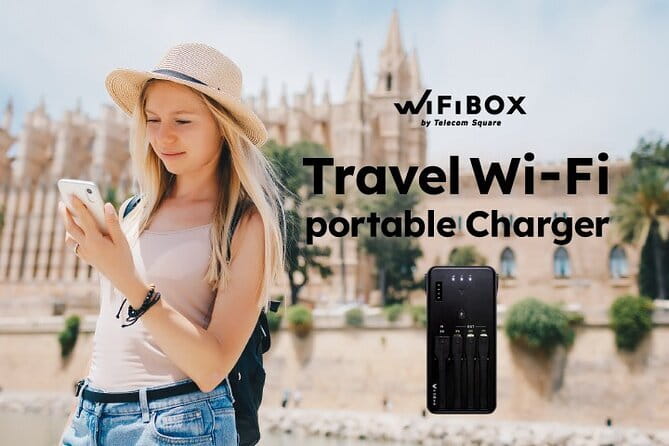
- Power bank function included, plus cables for charging your phone
- No counters and fewer hassles thanks to the mobile ticket and pickup URL process
- Fair Usage Policy applies, so truly endless heavy use can face limits
WiFiBOX at Narita: scan-and-go, not counter lines
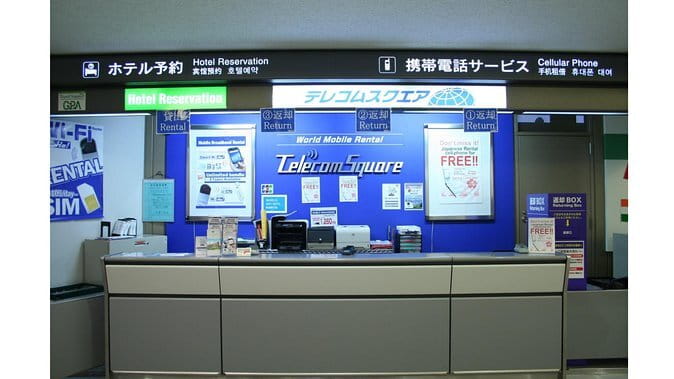
Narita International Airport is where this rental starts, and that is a big deal if you land tired and hungry. The concept is simple: you reserve your device ahead of time, you get a pickup URL before your rental start date, and you use that to get connected without the usual “wait, explain, repeat” routine.
Once you reach the Narita address listed for the start point, you’re essentially picking up the router and walking away with your connection working. The experience is positioned as self-service. That typically means fewer staff interactions, which often translates to less time lost on arrival day. And because your return ends back at the same meeting point, the exit plan is also straightforward.
Two small details help you avoid stress:
- You have a designated day for pickup, and pickup outside business hours can be treated as invalid.
- If the device is not collected during business hours or by the specified pickup date, you should expect no refund.
If your Japan trip hinges on navigating trains, reserving tickets, or translating on the fly, starting with a reliable airport pickup flow is worth real money, even if it is not flashy.
A few more Narita days to weigh up
- Narita Airport (NRT) Private Transfer to Central Tokyo
★ 4.5 · 300 reviews - Private arrival Transfer from Narita Airport(NRT) to central Tokyo city
★ 4.5 · 128 reviews - From Narita Airport: Private Layover or Transit Guided Tour
★ 4.8 · 29 reviews
Unlimited 4G LTE for up to five devices (and why that matters)
This hotspot is designed for shared travel. One WiFiBOX device can connect up to five devices simultaneously, using unlimited 4G LTE service at a flat rate. For you, that means fewer competing connections and fewer devices fighting over a weak signal, especially in busy transit hubs or while you’re splitting time between sightseeing and logistics.
That “up to five devices” number matters in real life:
- Families can keep phones working for maps and messaging without passing one connection around.
- Small groups can coordinate meeting points without each person hunting for their own data plan.
- Even if you only have one phone, it can be comforting to keep a second device (like a tablet or a spare SIM-less phone) online.
Now, the catch. Unlimited does not always mean unlimited in practice. Your data can be limited under the Fair Usage Policy (FUP). The policy is tied to how mobile providers manage heavy usage, so if you are planning marathon video uploads, constant hotspotting for laptops, or extremely data-heavy use, you should treat the “unlimited” claim as “unlimited for normal traveler use,” not “no limits for power users.”
I suggest a practical strategy: plan to use the connection for navigation, messaging, and browsing, then save big downloads or uploads for when you are on hotel Wi-Fi when possible. That keeps you comfortably inside the intended use.
The power bank bonus: a small included item with big payoff
This rental is not only Wi-Fi. The WiFiBOX can also act as a portable charger. That is a quiet upgrade that you will really feel after your first full day out. Japan is a “walk first, charge later” kind of trip if you do it right, and your phone battery becomes your lifeline for maps, photos, and communications.
What helps is that the box includes:
- A portable charger function
- A USB cable for charging the WiFi router
- Other cables for charging your phone
What is not included is the AC adapter. So you’ll want to bring your own plug from home (or use a USB port from your hotel). In other words, you’re covered on cables, but you supply the wall plug.
One caution: since the device is both your internet and your charger, handle it carefully. If you rely on it all day, treat it like you would treat a phone charger you cannot replace easily.
From pickup day to return day: keep it simple and on schedule
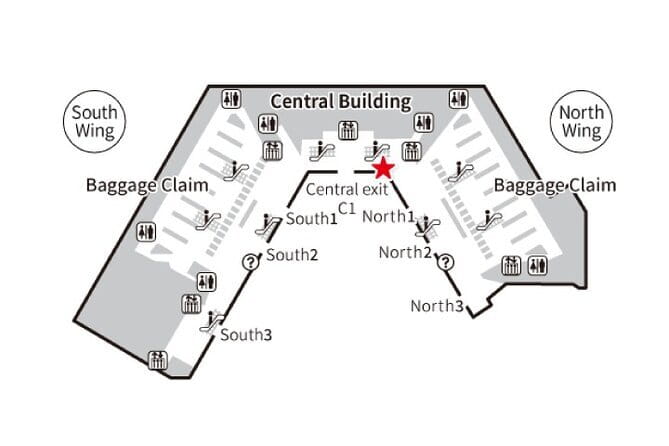
This is a rental with a start and end at the airport meeting point. The duration listed is about 3 to 17 days (approx.), so your trip length will determine how long you keep the router.
Because the rental is capped at 5 travelers for the activity, the process is meant to be low-friction. Still, your personal schedule matters. You should:
- Pick up your device on the designated day and during business hours
- Return it back at the airport meeting point, since the activity ends there
If you miss your pickup window or you do not collect it during business hours, a refund is not issued. Also, after booking and payment, you are not able to change details directly. If you need changes, you must cancel your application and submit a new one at least a day before your pick-up date.
Practical tip: if your flight times are tight, build slack into your plan. Narita can be smooth, but immigration and rail connections are still human timing. A little buffer reduces the chance you show up exactly at the wrong hour.
A different sort of day in Japan:
- Airport transfer: Narita, Haneda (Tokyo), HND-NRT Airport shuttle
★ 4.5 · 26 reviews - For Narita Airport Users: Layover or Transit Guided Private Tour
★ 5.0 · 22 reviews - Tokyo Narita Airport(NRT) : Private Transfers to/from Tokyo City
★ 3.5 · 22 reviews - 3 Day Japan Highlights Tour: Tokyo, Mt.Fuji, Nara, Kyoto, Osaka
★ 5.0 · 22 reviews
Real-world performance: speed, battery life, and the rare outage

The feedback pattern for this kind of portable router usually comes down to three things: speed, battery, and reliability in the places you actually spend time.
Here, the device is presented as fast and stable, especially for common travel use like:
- Google Maps navigation
- Calling or messaging while moving through subways and stations
- Handling multiple devices without everyone feeling the lag
Battery life is a major quality-of-life point, and the included portable charger function helps during long travel days. Multiple devices supported also reduces the “one phone kills the connection” problem that can ruin coordination.
Now the part you should not ignore. Even in good systems, signal can drop. One reported issue was longer periods without signal, around 12 hours, occurring twice. That’s not the most common outcome, but it is enough that I would plan for a backup for critical moments.
Backup plans that cost you nothing:
- Download offline maps before you head out
- Screenshot key addresses or reservation confirmations
- Keep a local SIM or eSIM option only if your itinerary is extremely time-sensitive (not required for everyone, but useful if you are scheduling meetings)
If you are comfortable traveling with a small offline safety net, portable Wi-Fi becomes the easiest way to stay connected without paying for roaming.
Price and value at about $9.71 per person

At $9.71 per person, this is priced like a “small fee that prevents big headaches” purchase. The value logic is pretty direct: you avoid international data roaming charges, you get stable use across multiple days, and you can share one hotspot across up to five devices.
Where the deal gets stronger for you:
- If you are traveling as a family or small group, shared access spreads the cost.
- If you use your phone constantly for navigation and messaging, the cost-to-convenience ratio is excellent.
- If you would otherwise rely on patchy Wi-Fi at hotels and resorts, a dedicated connection can save time hunting for working networks.
There is one value caution. Because duration varies (about 3 to 17 days), your per-day cost depends on how long you rent. Check the rental length you select, then compare it to what data roaming would cost for the same number of days on your phone plan. Even if you do not know the exact roaming price, you can still make a smart estimate using “days times likely GB per day.”
Who this Wi-Fi rental suits best (and who should pause)
This setup is family friendly and intended for all ages and skill levels. If you can handle scanning something and charging a device, you’re ready. The equipment is included, the goal is quick pickup and drop off, and the connection capacity fits group travel.
It is a great match if you:
- Want reliable maps and communication without swapping SIM cards
- Are traveling with kids who will want screens constantly
- Have two or more people who need data at the same time
It may be worth thinking twice if you:
- Are a heavy user who plans to push large uploads or hotspot laptops all day
- Need the Wi-Fi device to work during exact high-stakes moments without any chance of signal drop
- Are unclear about where you can return the device, since the activity ends back at Narita meeting point and one account complained about being told a different return location
The takeaway is simple. For normal tourism and everyday phone use, this rental usually feels like a bargain. For extreme usage patterns or inflexible timing, you should plan backups.
Insurance and setup details you should not ignore
Insurance is where expectations can get messy, so read it calmly. Wi-Fi insurance is not included in all plans. If you do not buy insurance and something happens, you can be charged a compensation fee of up to ¥25,000 for loss or damage.
Also note what you might need from your own kit:
- No AC adapter is included
- No detailed Wi-Fi instructions are included
- There is a mention that Wi-Fi insurance varies by plan
The good news is setup is designed to be easy with the pickup URL process and scanning. Still, pack like a realist:
- Bring the charging plug you already own
- Keep the device somewhere safe in your bag
- Treat it like gear, not like a disposable gadget
The quick decision guide: should you book this at Narita?
If your goal is to land in Japan and immediately have working maps, messaging, and internet for multiple devices, this is a strong choice. You get airport convenience at Narita, you can connect up to five devices, and the power bank function is a practical lifesaver on long days.
Book it if:
- You want unlimited 4G LTE for typical traveler use
- You are traveling as a family or small group
- You value a fast Narita pickup and a clear return plan
Consider alternatives or plan backups if:
- You plan very heavy data use that could trigger limits under the Fair Usage Policy
- You are extremely dependent on nonstop connectivity for time-critical tasks
- Your itinerary includes complex plans where return location flexibility would matter more than returning at Narita
FAQ
How many devices can I connect to one WiFiBOX?
You can connect up to 5 devices simultaneously.
Is the data unlimited?
Yes, the rental is advertised as unlimited data at a flat rate, but it is subject to a Fair Usage Policy (FUP).
What kind of internet does the router use?
It uses unlimited 4G LTE internet access.
Does the WiFiBOX work as a power bank?
Yes, it can function as a portable charger, and it includes charging cables.
Where do I pick up the device?
The pickup is at Narita International Airport, at 1-1 Furugome, Narita, Chiba 282-0004, Japan.
Where do I return the device?
The activity ends back at the same meeting point, at Narita International Airport.
Is Wi-Fi insurance included?
Wi-Fi insurance is not included in all plans. If you do not have coverage and the device is lost or damaged, a compensation fee of up to ¥25,000 may be charged.
Can I cancel for a full refund?
Yes. You can cancel up to 24 hours in advance for a full refund.
After booking, can I change the pickup details?
After booking and payment, no changes can be made to the application details. If changes are needed, you must cancel and submit a new one at least one day before the pick-up date.
Newly listed around Narita
- Tokyo Layover Tour with a Local – Private & Tailored to You★ 4.5 · 12 reviews
- Japan Unlimited WiFi Router – Narita Airport Pickup★ 3.5 · 15 reviews
- For Narita Airport Users: Layover or Transit Guided Private Tour★ 5.0 · 22 reviews
- Shared Arrival Transfer : Narita International Airport to Hotel (Central Tokyo)★ 4.0 · 12 reviews
- Airport transfer: Narita, Haneda (Tokyo), HND-NRT Airport shuttle★ 4.5 · 26 reviews
- Private arrival Transfer from Narita Airport(NRT) to central Tokyo city★ 4.5 · 128 reviews
- Private Car transfer from Narita airport to Tokyo★ 5.0 · 16 reviews
- Private Transfer from Narita Airport to Yokohama Port and City★ 4.5 · 17 reviews
Tokyo Tours, compared.

Mt Fuji and Hakone 1-Day Bus Tour Return by Bullet Train
Read our review →


teamLab Planets TOKYO Digital Art Museum Entry Ticket
Read our review →
Mt Fuji & Hakone Cruise, Drum Show Bullet Train 1 Day from Tokyo
Read our review →
Sumo Show Experience with Chicken Hot Pot and a Photo
Read our review →
Shinjuku Food Tour (13 Dishes at 4 Local Eateries)
Read our review →