Review · TOKYO TOURS
Japan: eSIM with Unlimited Local 4G/5G Data
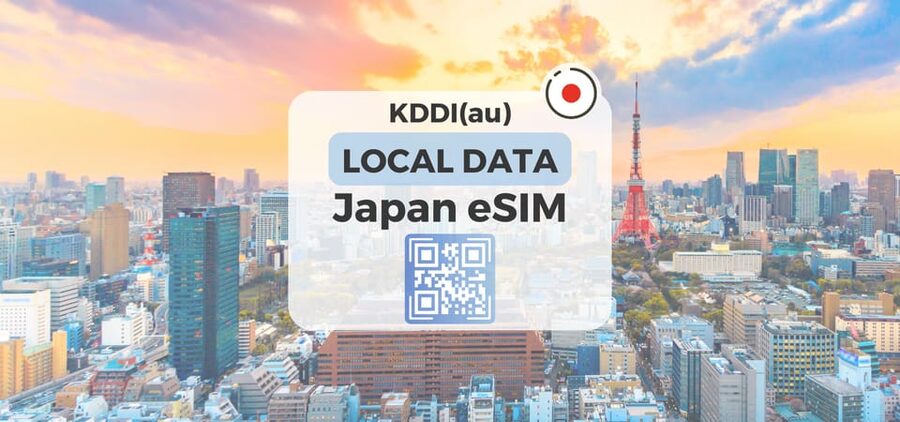
Japan hands you Wi-Fi anxiety, then it disappears with an eSIM. This plan gives you unlimited 5G/4G local data on Japan’s KDDI(au) network, activated by scanning an eSIM QR code. I like how fast setup feels, and I like that the signal can work even on the subway, but do note the 5G speed can drop indoors or underground, switching you to 4G.
Two more things that matter for real trips: you skip the physical SIM hassle, and you can still share data through hotspot (with limitations). The main drawback is simple, read the fine print, since the voucher QR code is not your eSIM QR code, and you need an eSIM compatible, unlocked phone.
In This Review
- Key Points at a Glance
- What This Japan eSIM Actually Gives You
- Price and Value: Why $10 Makes Sense (If You Plan to Use Data)
- Ultra vs Lite: Speed Rules You Can Feel
- Before You Leave: The Setup Checklist That Prevents Headaches
- QR Code Timing: The Voucher Confusion to Avoid
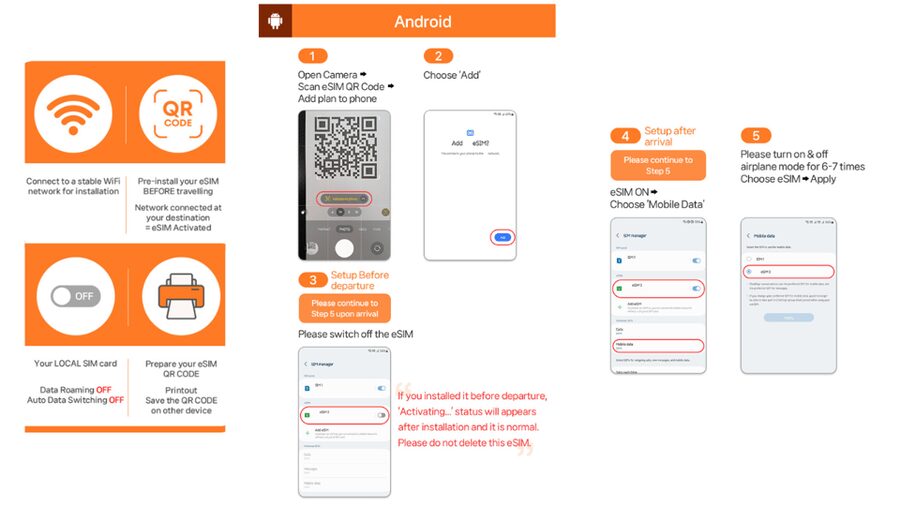
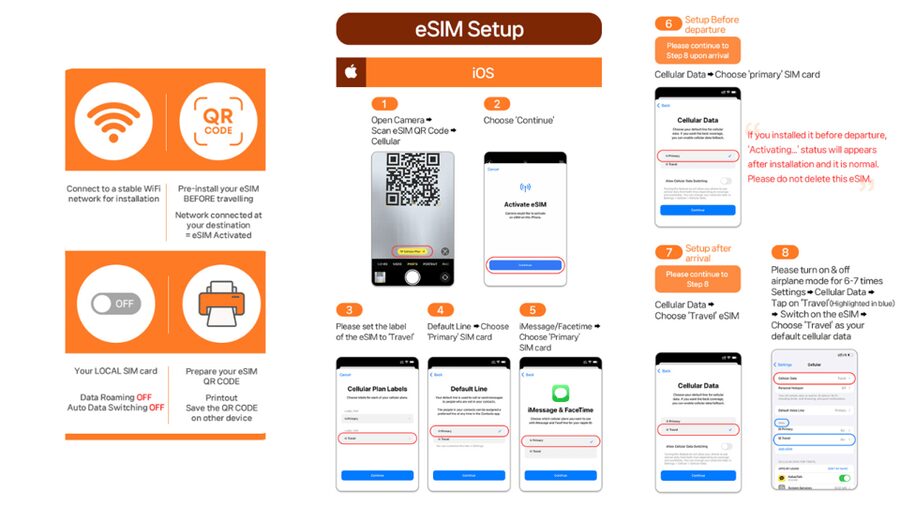
- Activating After You Land: How It Connects in Japan
- 5G vs 4G in Real Japan Conditions
- Hotspot Sharing: Useful, But Know the Limitations
- What’s Not Included: No Voice Calls or SMS
- Plan Duration and Day Counting: How Your Days Get Used
- If Things Go Wrong: QR Code and eSIM Troubleshooting
- Who This eSIM Suits Best
- Should You Book This Japan eSIM?
- FAQ
- When do I receive the eSIM QR code?
- Is the QR code on the voucher the eSIM QR code?
- How can I check if my phone supports eSIM?
- Does the eSIM connect right away?
- What is the difference between Ultra and Lite?
- Does the plan include voice calls or SMS?
- Can I share data using a hotspot?
- What if I see a QR code is invalid message?
- Does 5G always work?
- What about refunds and cancellations?
Key Points at a Glance
- Unlimited local 5G/4G on KDDI(au), usable across Japan
- Ultra vs Lite options (Lite caps speed at 10 Mbps)
- eSIM QR code arrives separately by email, not inside the voucher QR
- Activation happens after you arrive in Japan, so plan your timing
- Hotspot works with limitations, depending on the selected plan
What This Japan eSIM Actually Gives You
This is a Japan-only eSIM data plan for Honshu, running on KDDI(au). In plain terms, you get mobile data for maps, messaging apps, rideshare, and translate tools without installing a physical SIM card.
You’re choosing between two versions. The Ultra plan is unlimited 5G/4G local data with no throttling, while the Lite plan is also unlimited local data but with a maximum data speed of 10 Mbps. Both options cover 5G/4G and do not include voice calls or SMS.
One small detail that shapes the experience: the eSIM connects to the local network only after you arrive in Japan. That means you should not expect it to function like a roaming internet ticket while you are still away from Japan.
A few more Tokyo days to weigh up
- Mt Fuji and Hakone 1-Day Bus Tour Return by Bullet Train
★ 5.0 · 26,383 reviews - 1-Day Tokyo Bus Tour
★ 5.0 · 14,250 reviews - Tokyo: TOKYO SKYTREE® Admission ticket
★ 4.5 · 11,192 reviews
Price and Value: Why $10 Makes Sense (If You Plan to Use Data)
The price shown is $10 per person, which is attractive for a data-heavy trip. The value comes from the fact that the plan is built around local, unlimited data use rather than small daily bundles.
Here is the honest tradeoff. If you only need data for a few navigation checks, Lite can be enough because most “online on the go” tasks do not need 100 Mbps. If you rely on constant uploads, heavy map redraws, video calls via apps, or you just hate any slowdowns, Ultra is the better fit since it is listed as unthrottled.
Also, plan duration matters. Ultra can run for 3 to 30 days, while Lite is 3 to 10 days. If your trip stretches beyond that window, the available option affects value more than the headline price.
Ultra vs Lite: Speed Rules You Can Feel
The difference between Ultra and Lite is not subtle on paper.
- Ultra: Unlimited 5G/4G local data with no throttling.
- Lite: Unlimited 5G/4G local data with max speed at 10 Mbps.
That 10 Mbps cap can still feel fine for maps, messaging, and browsing, but it can be noticeable for things like large downloads, faster video streaming, or sharing your connection while multiple devices try to use data.
Both plans list hotspot support with limitations. In practice, this is where Ultra often becomes worth it, because tethering is one of those trip behaviors that can turn “unlimited” into “I wish this were faster” pretty quickly.
Before You Leave: The Setup Checklist That Prevents Headaches
I treat eSIM installs like boarding passes. Do it early, keep it simple, then you are set.
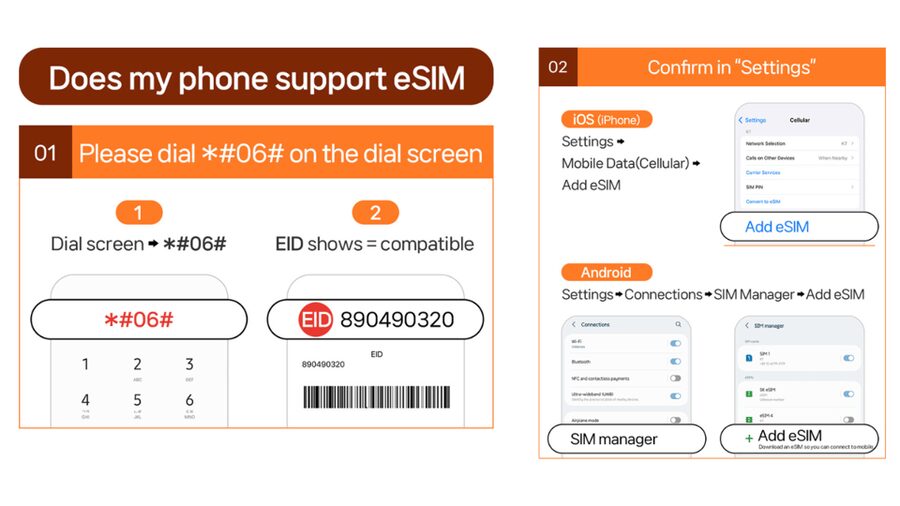
Start with device compatibility. The plan notes an easy self-check: press #06# and see whether you get an EID. If EID does not show, your phone likely does not support eSIM.
Next, make sure your phone is unlocked. The plan specifically says your phone must be unlocked for a foreign SIM/eSIM. Locked phones are the most common reason people get stuck at the exact moment they land.
Finally, check that you know which QR code you are dealing with. The voucher QR code is not the eSIM QR code. The eSIM QR code is delivered separately via email 1 day before the activity date.
A different sort of day in Japan:
- Tokyo: teamLab Planets TOKYO Digital Art Museum Entry Ticket
★ 4.6 · 9,779 reviews - Mt Fuji & Hakone Cruise, Drum Show Bullet Train 1 Day from Tokyo
★ 4.0 · 7,413 reviews - Tokyo: Sumo Show Experience with Chicken Hot Pot and a Photo
★ 4.8 · 6,678 reviews - Tokyo: Shinjuku Food Tour (13 Dishes at 4 Local Eateries)
★ 5.0 · 6,603 reviews
QR Code Timing: The Voucher Confusion to Avoid
Here is the big “gotcha” with these eSIM plans: the QR code on the GetYourGuide voucher is not the one you need to install the eSIM.
You will receive the actual eSIM QR code via email, 1 day before the activity date. That means you should watch for that email around the day before arrival, not the moment you are trying to get online at the airport.
If you install using the wrong QR code, you can get stuck with an error like QR code is invalid. When that happens, don’t keep scanning the same thing. Instead, check your phone’s SIM settings.
Activating After You Land: How It Connects in Japan
The plan states that the eSIM will connect to the local network after you arrive in Japan. So your workflow is usually:
- Install the eSIM using the emailed QR code (on your schedule).
- Wait to connect until you are actually in Japan.
- Confirm your phone registers the KDDI(au) network.
The plan also notes that the eSIM QR code must be installed and activated within 30 days of purchase. That gives you a window, but it is not infinite. If you buy far ahead, mark the date and don’t forget.
For speed, I recommend doing the install before you leave your hotel room on arrival day. You want your first connection set up before you start walking, because subway stairs plus no data gets old fast.
5G vs 4G in Real Japan Conditions
The promise is unlimited 5G/4G local data, but the plan is also upfront about signal behavior. 5G can be affected by location such as indoors, underground, or crowded areas. When that happens, you switch to 4G.
This is normal for any cellular setup, and it’s still good news for you. Even when 5G drops, you still keep data access, and the reviews associated with this plan point to reliable connectivity, including on the subway.
Your practical takeaway: don’t judge the plan by your first two minutes in a station tunnel. If you step into a more open area and 5G is available, it may bounce back. If not, 4G still keeps your apps working.
Hotspot Sharing: Useful, But Know the Limitations
Hotspot is included, but with limitations depending on the selected plan. The plan also lists usage calculation and gives a table that ties duration to a data amount (for example, 3 days shows 3GB, 10 days shows 9GB, and 30 days shows 30GB).
Because the details are presented as a usage calculation and the hotspot note says limitations apply, I treat that table as your heads-up for tethering expectations. In other words: unlimited for your phone does not automatically mean unlimited for every device you connect.
How to use hotspot wisely:
- Keep tethering to one or two devices when possible.
- Save big downloads for when you have a strong connection and time.
- If you are traveling as a couple or with a small group, Ultra may feel better when everyone shares the same moment.
What’s Not Included: No Voice Calls or SMS
This plan includes data, not phone services. Voice & SMS are listed as N/A.
So if you need a real phone number for calls or text-based verification, plan for alternatives. Use data apps for messaging, or make sure you have whatever authentication method your services support outside of SMS.
For most trips, this is fine. For the handful of situations where SMS verification matters, it becomes a reason to plan ahead so you do not scramble at check-in.
Plan Duration and Day Counting: How Your Days Get Used
Duration is calendar-day based. The plan explains that it is calculated based on calendar days starting from the first connection to the KDDI(au) network in Japan.
Example given: if activation happens at 10 PM Japan time, it counts as 1 full day by midnight. That tells you the clock is not “24 hours from install.” It is more like “Japan calendar day counting” once the network connection begins.
This matters if you have a late-arrival flight or you plan to leave quickly after landing. If you want to minimize wasted time, try to connect closer to when you actually start using data heavily.
If Things Go Wrong: QR Code and eSIM Troubleshooting
If your device tells you the QR code is invalid, the plan gives a specific troubleshooting step. Go to:
- Settings > Cellluar (iOS)
- Settings > Connections > SIM Manager (Android)
Check whether there is a new eSIM showing on that page. If the eSIM appears there, you might simply need to activate it properly rather than reinstall everything.
If you are still stuck, you should contact the supplier via email or WhatsApp. That is especially important because refunds will not be accepted once the eSIM QR code has been sent, so you want your setup to work without delay.
Who This eSIM Suits Best
This plan is a great match if you want simple mobile data in Japan with minimal hassle. You do not want to hunt for a physical SIM counter, you want your maps to work quickly, and you want the reliability of a local network.
I especially like it for:
- Short to medium Japan trips where you rely on navigation and messaging apps
- People who travel with one phone as the “main device,” then share via hotspot sparingly
- Anyone who values fast setup and strong connectivity in busy areas, including transit
It may be less ideal if:
- You need voice calls or SMS messaging included
- Your phone is not eSIM compatible, or you cannot unlock it
- You want huge tethering loads for multiple devices all day, every day
Should You Book This Japan eSIM?
Book it if you have an eSIM compatible, unlocked phone and you want unlimited local data on KDDI(au) without the SIM swap routine. Ultra is the smarter choice if speed and tethering matter to your plans, while Lite can be fine if you are mostly browsing, mapping, and using apps that do not need high throughput.
Skip it if your trip depends on SMS verification or voice calls, or if you know you will need heavy hotspot usage across multiple devices. Also, only buy if you are okay with the QR code arriving by email the day before, because that timing is part of how the product works.
If you want a low-stress Japan tech day, this is one of the cleaner options.
FAQ
When do I receive the eSIM QR code?
The eSIM QR code is delivered to you separately via email 1 day before the activity date.
Is the QR code on the voucher the eSIM QR code?
No. The QR code on the voucher is not the eSIM QR code. You will get the eSIM QR code by email instead.
How can I check if my phone supports eSIM?
On the dial screen, press #06# and check whether EID shows. If EID does not show, the device is likely incompatible with eSIM.
Does the eSIM connect right away?
The plan states the eSIM connects to the local network after you have arrived in Japan.
What is the difference between Ultra and Lite?
Ultra is unlimited 5G/4G local data with no throttling. Lite is unlimited 5G/4G local data with a max data speed of 10 Mbps.
Does the plan include voice calls or SMS?
No. Voice & SMS are listed as N/A.
Can I share data using a hotspot?
Yes. Hotspot sharing is supported with limitations depending on the selected plan.
What if I see a QR code is invalid message?
Check whether a new eSIM is showing by going to Settings > Cellluar (iOS) or Settings > Connections > SIM Manager (Android). If it still fails, contact the supplier via the email or WhatsApp provided.
Does 5G always work?
The plan notes 5G signal can be affected by location like indoors, underground, or in crowded areas, so it may switch to 4G.
What about refunds and cancellations?
Cancel up to 24 hours in advance for a full refund. Refunds will not be accepted once the eSIM QR code has been sent.
Newly listed around Tokyo
- Japanese Traditional Music Show in Tokyo★ 5.0 · 72 reviews
- Japanese Traditional Sweets making★ 4.1 · 19 reviews
- Historic Kanda Sake Tasting at Tokyo’s Oldest Shop (1596)★ 4.9 · 33 reviews
- Highlights of Tokyo Private Tour with a Licensed Guide★ 4.5 · 11 reviews
- Harajuku: Kawaii Fashion and Pop-Culture Tour★ 4.7 · 12 reviews
- Mount Fuji – Hakone & Onsen Full Day Private Tour★ 3.8 · 6 reviews
- Graffiti in Tokyo Walking Tour: Shibuya and Harajuku★ 5.0 · 41 reviews
- Tokyo Oldtown: Historic Landmarks Go Kart Tour (100 Minutes)★ 5.0 · 8 reviews
Tokyo Tours, compared.

Mt Fuji and Hakone 1-Day Bus Tour Return by Bullet Train
Read our review →


teamLab Planets TOKYO Digital Art Museum Entry Ticket
Read our review →
Mt Fuji & Hakone Cruise, Drum Show Bullet Train 1 Day from Tokyo
Read our review →
Sumo Show Experience with Chicken Hot Pot and a Photo
Read our review →
Shinjuku Food Tour (13 Dishes at 4 Local Eateries)
Read our review →