Review · OSAKA TOURS
Osaka Kansai Airport | Japan Wi-Fi Rental | Unlimited Data
Instant internet at the terminal. This Osaka Kansai Airport Wi-Fi rental keeps things simple with self-service pickup and unlimited 4G LTE data for a flat rate, so you can get maps, messaging, and plans working right away. I like that one hotspot can support up to five devices, and I also like that it doubles as a portable charger for day-to-day travel needs. One thing to consider: battery life may not always match the optimistic expectations, so I’d plan as if you will need to recharge at least once during busy travel days.
If you want the kind of Japan trip where your phone actually helps instead of just sitting there, this is a straightforward way to stay connected. Pickup and return are handled around Kansai, and you use a pickup URL and a mobile ticket approach to scan and go. The main practical tradeoff is that unlimited data still follows a fair-use policy, so very heavy usage patterns can run into limits.
In This Review
- Key things to know before you book
- Why an Osaka Kansai Airport Wi-Fi rental beats SIM juggling
- How WiFiBOX pickup and return work at Kansai Airport Terminal 2
- Timing tip that will save you stress
- Devices, power, and the battery reality check
- How I’d plan around battery limits
- Unlimited data, fair-use limits, and how to stay within the lines
- Practical best practice
- Family-friendly convenience for up to 5 connected devices
- What’s actually included, and what you still need
- The missing AC adapter part matters
- Insurance is optional depending on your plan
- Price and value: when $9.69 per person makes sense
- Is it worth it for short trips?
- Who should book this WiFiBOX rental from Kansai
- Who should consider alternatives
- Should you book this WiFiBOX rental?
- FAQ
- Where is the WiFiBOX pickup location at Osaka Kansai Airport?
- Is the internet data unlimited?
- How many devices can connect to the hotspot at the same time?
- Does the Wi-Fi rental work as a power bank?
- What’s included in the rental package?
- Is an AC adapter included?
- Is Wi-Fi insurance included?
- When do I need to pick up the device?
- Can I cancel for free?
- How many people is this activity limited to?
Key things to know before you book
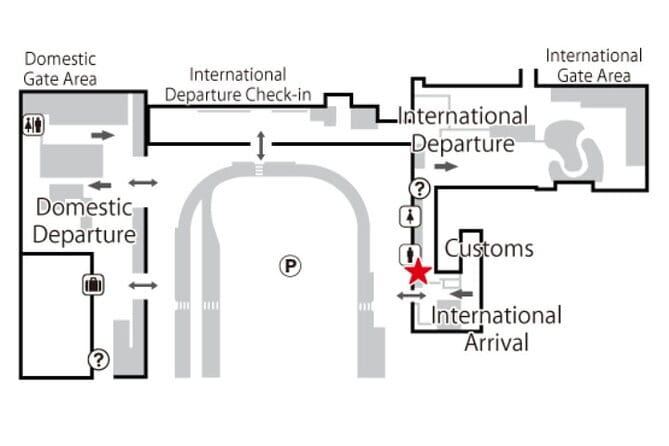
- Kansai Terminal 2 pickup point: Start at Terminal 2, 11-1 Senshūkūkōnaka, Tajiri, Sennan District, Osaka 549-0011, Japan.
- Up to 5 devices at once: One unit can cover multiple phones and tablets in your group.
- Unlimited data with fair-use limits: Flat rate is unlimited, but data use can be limited under the Fair Usage Policy.
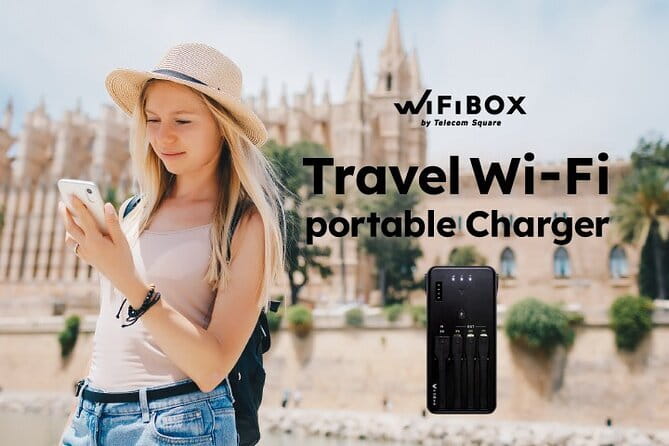
- Power bank support: The WiFiBOX setup includes a portable charger function, plus multiple charging cables.
- Self-service, no counter lines: You handle it with scan and go style pickup and a return back at the meeting point.
- Small group handling: Maximum of 5 travelers for this activity.
Why an Osaka Kansai Airport Wi-Fi rental beats SIM juggling
In Japan, reliable internet is not just for entertainment. It is how you keep your bearings on trains, confirm last-minute platform changes, translate signage, and book the next stop without guessing. A pocket hotspot means you are not dependent on finding Wi-Fi in cafés or airports, and you do not have to manage multiple SIM installs across devices.
This specific Osaka Kansai Airport option is priced at $9.69 per person, and the rental window is listed as 3 to 17 days (approx.). That matters because you are not just paying for connectivity on day one. You are paying for the convenience of having the same setup from arrival through departures, with pickup and return tied to Kansai.
I especially like the practical design for real travel routines:
- Unlimited data at a flat rate for the rental period
- Up to 5 devices connected simultaneously
- A portable charger function for those long days when you are out navigating
If you are traveling as a couple, a small family, or a group of friends, that device limit is a big deal. It is the difference between buying separate internet for each person and just sharing one unit.
A few more Osaka days to weigh up
- Osaka Go Karting Tour with Funny Costume
★ 5.0 · 2,658 reviews - Osaka Castle: Museum and Tower Entry Ticket
★ 4.5 · 2,380 reviews - Osaka: Shinsekai Food Tour with 13-15 Dishes at 5 Eateries
★ 4.8 · 2,204 reviews
How WiFiBOX pickup and return work at Kansai Airport Terminal 2
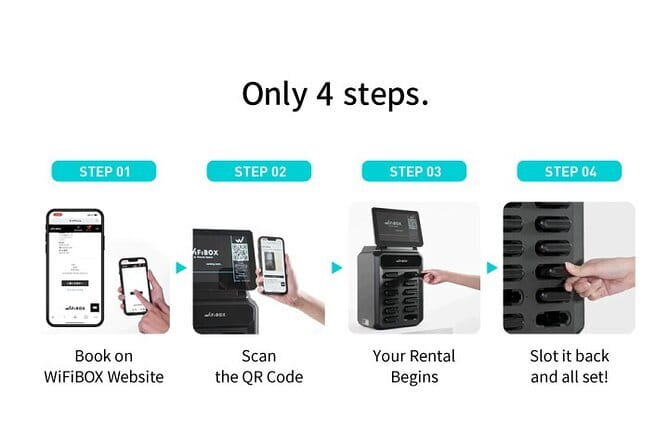
The meeting point is clearly stated: Terminal 2, 11-1 Senshūkūkōnaka, Tajiri, Sennan District, Osaka 549-0011, Japan. The activity starts at that location and ends back at the meeting point, so your return plan does not require a scavenger hunt.
The flow is designed to be fast and self-directed:
- You book ahead.
- You receive a pickup URL before your rental start date.
- You scan and go at the airport.
This is one of the reasons portable Wi-Fi can feel less stressful than other connection options. You are not waiting for a counter, and you are not trying to figure out language-heavy steps right after a flight.
A useful detail from real-world experience is that the return can be as simple as leaving the device in the airport mailbox when you depart. That lines up with the overall promise of no lines and quick drop-off.
Timing tip that will save you stress
Read the rule about pickup during business hours. If the device is not collected during those hours or by the specified pick-up date, a refund will not be issued. In practice, that means you should plan your arrival and transfer time so you can still make pickup without rushing through the airport.
Devices, power, and the battery reality check
WiFiBOX is built to support multiple devices. The listing says you can connect up to 5 devices simultaneously. That is perfect for:
- Two people sharing one hotspot
- A parent plus two kids
- A group where everyone needs messaging and navigation
It also includes a portable charger function. The practical value here is simple: phones and tablets drain fast when you are using navigation, mapping apps, camera translation, and constant screen updates. With the hotspot acting as a power source, you can avoid some of the “find an outlet right now” moments.
Included charging gear is part of the convenience package:
- USB cable for charging the WiFi router
- Other 3 cables for charging your phone
But there are two important cautions:
- An AC adapter is not included, so you may need your own wall plug.
- One disappointment in the experience is battery life. A review described a battery that held roughly 7 to 8 hours instead of the expected around 9 hours, and the battery did not last as long as hoped.
A different sort of day in Japan:
- Osaka Food Tour: 13 Dishes at 5 Local Eateries
★ 5.0 · 2,149 reviews - Hungry Osaka Street Food Tour:15 Tastings & 3 Drinks with a Local
★ 5.0 · 1,727 reviews - Osaka: teamLab Botanical Garden Entry Ticket
★ 4.5 · 1,710 reviews - Osaka: Tea Ceremony Experience
★ 4.9 · 1,426 reviews
How I’d plan around battery limits
If your day starts early and you expect heavy use, do not plan on the hotspot battery lasting from morning to night without recharging. Instead:
- Charge the device fully right at pickup.
- If you will be out all day, bring an extra power source you can trust.
- Consider downloading key maps and booking confirmations ahead of time, so your phone does not keep pulling data constantly.
That way, even if the battery runs a little shorter on a given day, you are not stuck.
Unlimited data, fair-use limits, and how to stay within the lines
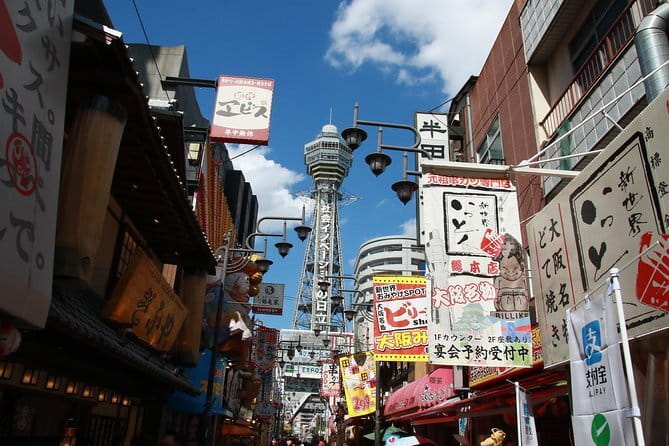
The big headline is unlimited data. The listing states unlimited 4G LTE internet access at a flat rate. Still, it also includes a note about packet limitation due to mobile service providers’ Fair Usage Policy (FUP).
Here is what that means in plain travel terms:
- You get unlimited data pricing for the rental period
- But extremely heavy usage patterns can trigger limits under a fair-use framework
This matters most if you plan to do things like large downloads, constant high-bandwidth streaming, or tethering a laptop while you are using the hotspot. Even if you are not doing that, the fair-use policy can show up as slower performance after heavy use.
Practical best practice
Use the hotspot as your main connection for navigation, messaging, social apps, and normal browsing. If you want to download big files, try to schedule it during times when you are not also doing high-usage tasks, like streaming video on the move.
Family-friendly convenience for up to 5 connected devices

The listing calls it family-friendly, and the setup supports that. With up to five devices on one hotspot, you can keep everyone connected without building a separate plan for each person.
This is especially valuable in Japan where people often split up:
- One person runs ahead to find the entrance.
- Another checks transit options.
- Someone else translates the menu.
When every phone has internet, it is easier to regroup and keep the day moving.
I also like that it is meant for a wide range of travelers. The listing says most travelers can participate, and that it is near public transportation. That makes it more practical when you are already juggling luggage and transit cards.
What’s actually included, and what you still need
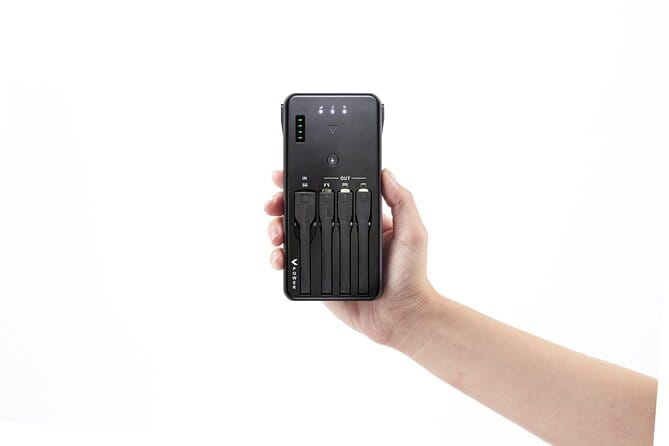
This is one of those rentals where the details really matter. Here is what you get:
- Rental Wi-Fi router with unlimited 4G LTE internet
- Portable charger
- USB cable to charge the WiFi router
- Other 3 cables for charging your phone
Not included:
- AC adapter
- Wi-Fi instructions
- Wi-Fi insurance in all plans
The missing AC adapter part matters
If you do not already have a compatible charging block, you will want to pack one. You can charge through USB, but you need the wall adapter somewhere along the way.
Insurance is optional depending on your plan
Wi-Fi insurance is not included in all plans. If you have no insurance and something happens that results in loss or damage, a compensation fee of up to ¥25,000 can be charged. That is a strong reason to check your plan details before you leave the airport.
Price and value: when $9.69 per person makes sense

At $9.69 per person, this looks like a budget-friendly add-on. But value depends on your travel style.
This rental is designed for connection throughout your trip, with a rental period listed as 3 to 17 days (approx.). The longer your trip, the more the “one device that covers everyone” approach tends to pay off.
It also connects up to five devices. For groups, that can be the difference between:
- everyone having reliable internet from day one, versus
- one person carrying the connection burden while others try to find Wi-Fi
One note on competitive value: there is a mention that it might be a bit more expensive than other portable units. The tradeoff offered in that feedback was that reception could be better. So if you have had spotty connectivity with cheaper hotspots in the past, you might appreciate paying a little more for steadier service.
Is it worth it for short trips?
If you are only in Japan for a couple days and you already plan to rely on hotel Wi-Fi, it might feel less necessary. But even on short trips, having navigation and translation on demand can save time and reduce stress, which is often worth more than the Wi-Fi savings alone.
Who should book this WiFiBOX rental from Kansai
This setup is a good match if you want:
- Easy arrival connection at Osaka Kansai Airport
- Multiple devices supported at once
- Unlimited data pricing for regular travel use
- A portable charger so your phone battery is not the weak link
It also fits well for families. With several devices allowed, you avoid the usual “one person has internet, everyone else is offline” problem.
Who should consider alternatives
Think twice if:
- You want long day battery without any recharging. The battery-life complaint suggests you cannot assume it will always last all day.
- You plan on very heavy data use. The fair-use policy note means unlimited is not always unlimited in performance under extreme use patterns.
- You are not comfortable handling returns by the designated pick-up date and business hours. If you miss the collection or return window, refund rules can apply.
Should you book this WiFiBOX rental?
I’d book it if you value convenience and reliable connectivity from the moment you land, especially with the ability to connect multiple devices and the added portable charger function. The Kansai Terminal 2 pickup is straightforward, and the return being easy at the airport helps when you are pressed for time.
Skip it or plan around the tradeoffs if battery life is a top priority for you or if you expect massive downloads and constant high-bandwidth streaming. In those cases, you might want a backup power strategy and a more cautious approach to data-heavy activity.
If your goal is a smoother Japan trip where your phone actually works like a travel tool, this is a solid, practical choice. And for a connection task that can derail the first day of any trip, that kind of simplicity is hard to beat.
FAQ
Where is the WiFiBOX pickup location at Osaka Kansai Airport?
The start meeting point is Terminal 2, 11-1 Senshūkūkōnaka, Tajiri, Sennan District, Osaka 549-0011, Japan.
Is the internet data unlimited?
Yes, the rental includes unlimited 4G LTE internet access at a flat rate. There is also a note about limitations due to a Fair Usage Policy.
How many devices can connect to the hotspot at the same time?
One hotspot can connect up to 5 devices simultaneously.
Does the Wi-Fi rental work as a power bank?
Yes. The WiFiBOX functions as a portable charger, and the listed inclusions include a portable charger and charging cables.
What’s included in the rental package?
You receive the rental Wi-Fi router with unlimited 4G LTE, a portable charger, a USB cable to charge the router, and other 3 cables to charge your phone.
Is an AC adapter included?
No, an AC adapter is not included.
Is Wi-Fi insurance included?
Wi-Fi insurance is not included in all plans. If you do not have insurance and the device is lost or damaged, a compensation fee of up to ¥25,000 may be charged.
When do I need to pick up the device?
You must pick up your device on the designated day and during business hours. If it is not collected during those times or by the specified pick-up date, a refund will not be issued.
Can I cancel for free?
Yes, there is free cancellation up to 24 hours in advance of the experience date for a full refund.
How many people is this activity limited to?
The listing notes a maximum of 5 travelers.
Newly listed around Osaka
- 2 Hours of Bar Hopping in Osaka Style★ 5.0 · 22 reviews
- Same-Day Osaka Food Crawl with local food and Hidden gems★ 5.0 · 114 reviews
- Osaka Authentic Local Izakaya Hopping Experience: Food & Drinks★ 5.0 · 99 reviews
- Well-balanced BENTO (lunch box) Cooking Class★ 5.0 · 35 reviews
- Anime Cosplay Photshoot-50 Digital Photos Provided★ 5.0 · 8 reviews
- OSAKA:Feel the Power! Learn Taiko Drum from Professionals★ 5.0 · 28 reviews
- Volleyball in Osaka & Kyoto with Locals!★ 5.0 · 21 reviews
- Three Types of Ramen Cooking Class in Osaka★ 5.0 · 119 reviews
Osaka Tours, compared.


Shinsekai Food Tour with 13-15 Dishes at 5 Eateries
Read our review →
Osaka Food Tour: 13 Dishes at 5 Local Eateries
Read our review →
Hungry Osaka Street Food Tour:15 Tastings & 3 Drinks with a Local
Read our review →